<!DOCTYPE html>
	<html lang="vi" xmlns="http://www.w3.org/1999/xhtml" prefix="og: http://ogp.me/ns#">
	<head>
<title>Hướng dẫn dọn sạch bloatware, quảng cáo và tối ưu hóa Windows 11 miễn phí với Winhance</title>
<meta name="description" content="Hướng dẫn dọn sạch bloatware, quảng cáo và tối ưu hóa Windows 11 miễn phí với Winhance - Savefile - Tin Tức -...">
<meta name="author" content="HỆ THỐNG LUẬT NGUYỄN - DỊCH VỤ LUẬT - TÀI CHÍNH KẾ TOÁN - THUẾ">
<meta name="copyright" content="HỆ THỐNG LUẬT NGUYỄN - DỊCH VỤ LUẬT - TÀI CHÍNH KẾ TOÁN - THUẾ [webmaster@luatnguyen.vn]">
<meta name="robots" content="index, archive, follow, noodp">
<meta name="googlebot" content="index,archive,follow,noodp">
<meta name="msnbot" content="all,index,follow">
<meta name="generator" content="Vinathis Agency v5.0_AI Web">
<meta name="viewport" content="width=device-width, initial-scale=1">
<meta http-equiv="Content-Type" content="text/html; charset=utf-8">
<meta property="og:title" content="Hướng dẫn dọn sạch bloatware, quảng cáo và tối ưu hóa Windows 11 miễn phí với Winhance">
<meta property="og:type" content="website">
<meta property="og:description" content="Savefile - Tin Tức - https&#x3A;&#x002F;&#x002F;luatnguyen.vn&#x002F;savefile&#x002F;tin-tuc&#x002F;huong-dan-don-sach-bloatware-quang-cao-va-toi-uu-hoa-windows-11-mien-phi-voi-winhance-1451.html">
<meta property="og:site_name" content="HỆ THỐNG LUẬT NGUYỄN - DỊCH VỤ LUẬT - TÀI CHÍNH KẾ TOÁN - THUẾ">
<meta property="og:url" content="https://luatnguyen.vn/tin-tuc/huong-dan-don-sach-bloatware-quang-cao-va-toi-uu-hoa-windows-11-mien-phi-voi-winhance-1451.html">
<link rel="shortcut icon" href="https://luatnguyen.vn/uploads/icon.png">
<link rel="canonical" href="https://luatnguyen.vn/tin-tuc/huong-dan-don-sach-bloatware-quang-cao-va-toi-uu-hoa-windows-11-mien-phi-voi-winhance-1451.html">
<link rel="alternate" href="https://luatnguyen.vn/rss/" title="Tin Tức" type="application/rss+xml">
<link rel="alternate" href="https://luatnguyen.vn/rss/dich-vu-doanh-nghiep/" title="Tin Tức - Dịch Vụ Doanh Nghiệp" type="application/rss+xml">
<link rel="alternate" href="https://luatnguyen.vn/rss/chuyen-doi-loai-hinh-doanh-nghiep/" title="Tin Tức - Chuyển đổi loại hình doanh nghiệp" type="application/rss+xml">
<link rel="alternate" href="https://luatnguyen.vn/rss/thanh-lap-doanh-nghiep/" title="Tin Tức - Thành Lập Doanh Nghiệp" type="application/rss+xml">
<link rel="alternate" href="https://luatnguyen.vn/rss/giai-the-doanh-nghiep/" title="Tin Tức - Giải Thể Doanh Nghiệp" type="application/rss+xml">
<link rel="alternate" href="https://luatnguyen.vn/rss/mua-ban-sap-nhap-cong-ty/" title="Tin Tức - Mua bán sáp nhập công ty" type="application/rss+xml">
<link rel="alternate" href="https://luatnguyen.vn/rss/tam-ngung-kinh-doanh/" title="Tin Tức - Tạm ngừng kinh doanh" type="application/rss+xml">
<link rel="alternate" href="https://luatnguyen.vn/rss/dau-tu-ra-nuoc-ngoai/" title="Tin Tức - Đầu tư ra nước ngoài" type="application/rss+xml">
<link rel="alternate" href="https://luatnguyen.vn/rss/thue-ke-toan/" title="Tin Tức - Thuế - Kế Toán" type="application/rss+xml">
<link rel="alternate" href="https://luatnguyen.vn/rss/khai-thue-ban-dau/" title="Tin Tức - Khai thuế ban đầu" type="application/rss+xml">
<link rel="alternate" href="https://luatnguyen.vn/rss/bao-cao-thue-tron-goi/" title="Tin Tức - Báo cáo thuế trọn gói" type="application/rss+xml">
<link rel="alternate" href="https://luatnguyen.vn/rss/bao-cao-tai-chinh/" title="Tin Tức - Báo cáo tài chính" type="application/rss+xml">
<link rel="alternate" href="https://luatnguyen.vn/rss/hoa-don-chung-tu/" title="Tin Tức - Hoá đơn chứng từ" type="application/rss+xml">
<link rel="alternate" href="https://luatnguyen.vn/rss/hoan-thien-so-sach/" title="Tin Tức - Hoàn thiện sổ sách" type="application/rss+xml">
<link rel="alternate" href="https://luatnguyen.vn/rss/quyet-toan-thue/" title="Tin Tức - Quyết toán thuế" type="application/rss+xml">
<link rel="alternate" href="https://luatnguyen.vn/rss/ho-tro-phap-luat/" title="Tin Tức - Hỗ Trợ Pháp Luật" type="application/rss+xml">
<link rel="alternate" href="https://luatnguyen.vn/rss/luat-doanh-nghiep/" title="Tin Tức - Luật doanh nghiệp" type="application/rss+xml">
<link rel="alternate" href="https://luatnguyen.vn/rss/luat-dan-su/" title="Tin Tức - Luật dân sự" type="application/rss+xml">
<link rel="alternate" href="https://luatnguyen.vn/rss/luat-hinh-su/" title="Tin Tức - Luật hình sự" type="application/rss+xml">
<link rel="alternate" href="https://luatnguyen.vn/rss/luat-bat-dong-san/" title="Tin Tức - Luật bất động sản" type="application/rss+xml">
<link rel="alternate" href="https://luatnguyen.vn/rss/luat-hon-nhan-va-gia-dinh/" title="Tin Tức - Luật hôn nhân và gia đình" type="application/rss+xml">
<link rel="alternate" href="https://luatnguyen.vn/rss/luat-lao-dong/" title="Tin Tức - Luật lao động" type="application/rss+xml">
<link rel="alternate" href="https://luatnguyen.vn/rss/di-chuc-va-uy-thac/" title="Tin Tức - Di chúc và uỷ thác" type="application/rss+xml">
<link rel="alternate" href="https://luatnguyen.vn/rss/so-huu-tri-tue/" title="Tin Tức - Sở hữu trí tuệ" type="application/rss+xml">
<link rel="alternate" href="https://luatnguyen.vn/rss/to-tung-tranh-tung/" title="Tin Tức - Tố tụng - Tranh tụng" type="application/rss+xml">
<link rel="alternate" href="https://luatnguyen.vn/rss/van-ban-phap-luat/" title="Tin Tức - Văn bản pháp luật" type="application/rss+xml">
<link rel="alternate" href="https://luatnguyen.vn/rss/van-ban-moi/" title="Tin Tức - Văn bản mới" type="application/rss+xml">
<link rel="alternate" href="https://luatnguyen.vn/rss/van-ban-sap-co-hieu-luc/" title="Tin Tức - Văn bản sắp có hiệu lực" type="application/rss+xml">
<link rel="alternate" href="https://luatnguyen.vn/rss/van-ban-con-hieu-luc/" title="Tin Tức - Văn bản còn hiệu lực" type="application/rss+xml">
<link rel="alternate" href="https://luatnguyen.vn/rss/tu-van-dau-tu/" title="Tin Tức - Tư vấn &amp; Đầu Tư" type="application/rss+xml">
<link rel="alternate" href="https://luatnguyen.vn/rss/tu-van-tai-chinh/" title="Tin Tức - Tư vấn tài chính" type="application/rss+xml">
<link rel="alternate" href="https://luatnguyen.vn/rss/dau-tu-tai-chinh/" title="Tin Tức - Đầu tư tài chính" type="application/rss+xml">
<link rel="alternate" href="https://luatnguyen.vn/rss/tu-van-m-a/" title="Tin Tức - Tư vấn M&amp;A" type="application/rss+xml">
<link rel="alternate" href="https://luatnguyen.vn/rss/dau-tu-mao-hiem/" title="Tin Tức - Đầu tư mạo hiểm" type="application/rss+xml">
<link rel="alternate" href="https://luatnguyen.vn/rss/tham-dinh-doanh-nghiep/" title="Tin Tức - Thẩm định doanh nghiệp" type="application/rss+xml">
<link rel="alternate" href="https://luatnguyen.vn/rss/doi-tac/" title="Tin Tức - Đối Tác" type="application/rss+xml">
<link rel="alternate" href="https://luatnguyen.vn/rss/ket-noi-giao-thuong/" title="Tin Tức - Kết nối giao thương" type="application/rss+xml">
<link rel="alternate" href="https://luatnguyen.vn/rss/cho-thue-van-phong/" title="Tin Tức - Cho thuê Văn Phòng" type="application/rss+xml">
<link rel="alternate" href="https://luatnguyen.vn/rss/dich-vu-van-phong-ao/" title="Tin Tức - Dịch vụ Văn Phòng Ảo" type="application/rss+xml">
<link rel="alternate" href="https://luatnguyen.vn/rss/tin-tuc/" title="Tin Tức - Tin tức" type="application/rss+xml">
<link rel="alternate" href="https://luatnguyen.vn/rss/tuyen-dung/" title="Tin Tức - Tuyển dụng" type="application/rss+xml">
<link rel="preload" as="script" href="https://luatnguyen.vn/assets/js/jquery/jquery.min.js">
<link rel="preload" as="script" href="https://luatnguyen.vn/assets/js/language/vi.js">
<link rel="preload" as="script" href="https://luatnguyen.vn/assets/js/global.js">
<link rel="preload" as="script" href="https://luatnguyen.vn/themes/default/js/news.js">
<link rel="preload" as="script" href="https://luatnguyen.vn/themes/default/js/main.js">
<link rel="preload" as="script" href="https://luatnguyen.vn/themes/default/js/bootstrap.min.js">
<link rel="StyleSheet" href="https://luatnguyen.vn/assets/css/font-awesome.min.css">
<link rel="StyleSheet" href="https://luatnguyen.vn/themes/default/css/bootstrap.min.css">
<link rel="StyleSheet" href="https://luatnguyen.vn/themes/default/css/style.css">
<link rel="StyleSheet" href="https://luatnguyen.vn/themes/default/css/style.responsive.css">
<link rel="StyleSheet" href="https://luatnguyen.vn/themes/default/css/news.css">
<link rel="StyleSheet" href="https://luatnguyen.vn/assets/css/default.vi.0.css">
<style>
	body{background: #fff;}
/* 1. Cấu hình vị trí khung chứa (Container) */
.nv-contact-sticky {
    position: fixed;
    left: 15px;      /* Cách lề trái */
    bottom: 80px;    /* Cách đáy */
    z-index: 999999; /* Luôn nổi lên trên */
    display: flex;
    flex-direction: column; /* Xếp dọc */
    gap: 15px;       /* Khoảng cách giữa 2 nút */
}

/* 2. Cấu hình chung cho 2 nút bấm */
.nv-contact-sticky a {
    display: flex;
    justify-content: center; /* Căn giữa ngang */
    align-items: center;     /* Căn giữa dọc */
    width: 50px;
    height: 50px;
    border-radius: 50%;      /* Bo tròn hoàn hảo */
    text-decoration: none;
    box-shadow: 0 4px 10px rgba(0,0,0,0.3); /* Đổ bóng nhẹ */
    position: relative;
    transition: transform 0.3s ease;
    color: #fff; /* Màu chữ/icon trắng */
}

/* Hiệu ứng phóng to khi di chuột */
.nv-contact-sticky a:hover {
    transform: scale(1.1);
}

/* 3. Thiết kế riêng cho nút Zalo (Hiển thị chữ) */
.btn-zalo {
    background: #0068ff; /* Màu xanh thương hiệu Zalo */
    font-family: Arial, sans-serif; /* Font chữ đơn giản, dễ đọc */
    font-weight: 900;    /* Chữ siêu đậm */
    font-size: 16px;     /* Kích thước chữ vừa vặn trong vòng tròn 50px */
    letter-spacing: -0.5px; /* Thu hẹp khoảng cách chữ xíu cho chặt chẽ */
}

/* 4. Thiết kế riêng cho nút Phone (Hiển thị Icon) */
.btn-phone {
    background: #43a047; /* Màu xanh lá cây */
    font-size: 24px;     /* Kích thước icon điện thoại */
}

/* 5. Hiệu ứng vòng tròn lan tỏa (Pulse Animation) */
.nv-contact-sticky a::before {
    content: '';
    position: absolute;
    width: 100%;
    height: 100%;
    border-radius: 50%;
    background: inherit; /* Lấy luôn màu nền của nút cha */
    opacity: 0.6;
    z-index: -1;         /* Nằm dưới nút */
    animation: pulse-animation 2s infinite;
}

/* Định nghĩa chuyển động rung */
@keyframes pulse-animation {
    0% { transform: scale(1); opacity: 0.6; }
    100% { transform: scale(1.6); opacity: 0; }
}

/* Trên mobile thì điều chỉnh vị trí chút cho gọn */
@media (max-width: 768px) {
    .nv-contact-sticky { left: 10px; bottom: 60px; }
}
</style>
	<!-- JSON-LD Structured Data: Organization + WebSite -->
	<!-- END Schema.org global structured data -->
	</head>
	<body>
<div id="print">
	<div id="hd_print">
		<h2 class="pull-left">HỆ THỐNG LUẬT NGUYỄN - DỊCH VỤ LUẬT - TÀI CHÍNH KẾ TOÁN - THUẾ</h2>
		<p class="pull-right"><a title="HỆ THỐNG LUẬT NGUYỄN - DỊCH VỤ LUẬT - TÀI CHÍNH KẾ TOÁN - THUẾ" href="https://luatnguyen.vn/">https://luatnguyen.vn</a></p>
	</div>
	<div class="clear"></div>
	<hr />
	<div id="content">
		<h1>Hướng dẫn dọn sạch bloatware, quảng cáo và tối ưu hóa Windows 11 miễn phí với Winhance</h1>
		<ul class="list-inline">
			<li>Thứ bảy - 21/02/2026 18:37</li>
			<li class="hidden-print txtrequired"><em class="fa fa-print">&nbsp;</em><a title="In ra" href="javascript:;" onclick="window.print()">In ra</a></li>
			<li class="hidden-print txtrequired"><em class="fa fa-power-off">&nbsp;</em><a title="Đóng cửa sổ này" href="javascript:;" onclick="window.close()">Đóng cửa sổ này</a></li>
		</ul>
		<div class="clear"></div>
		<div id="hometext">
			Việc thiết lập một chiếc PC Windows mới thường đi kèm với vô số ứng dụng rác và các menu cài đặt hệ thống phức tạp, lộn xộn. Bài viết này sẽ hướng dẫn bạn cách &quot;dọn dẹp&quot; hệ điều hành chỉ trong vài cú click chuột nhờ Winhance – một công cụ mã nguồn mở giúp việc quản lý Windows 11 trở nên đơn giản và trực quan.
		</div>
				<div class="imghome">
			<img alt="Nguồn&#x3A; Foundry" src="https://luatnguyen.vn/uploads/news/2026_02/debloat.png" width="460" class="img-thumbnail" />
		</div>
		<div class="clear"></div>
		<div id="bodytext" class="clearfix">
			<p data-path-to-node="5">Chắc hẳn không ít lần bạn cảm thấy khó chịu với những phần mềm cài sẵn không bao giờ dùng tới hay những quảng cáo vô duyên xuất hiện trên Windows 11. Sự phức tạp này thậm chí đã khiến nhiều người dùng từ bỏ Windows để chuyển sang Linux. Đừng vội nản lòng! Có một giải pháp hoàn toàn miễn phí mang tên Winhance. Phần mềm này giúp bạn gom mọi thiết lập tối ưu hóa, gỡ cài đặt ứng dụng rác và tùy biến giao diện vào chung một cửa sổ duy nhất. Hãy cùng khám phá cách công cụ này trả lại sự mượt mà cho chiếc PC của bạn.<br  />
<br  />
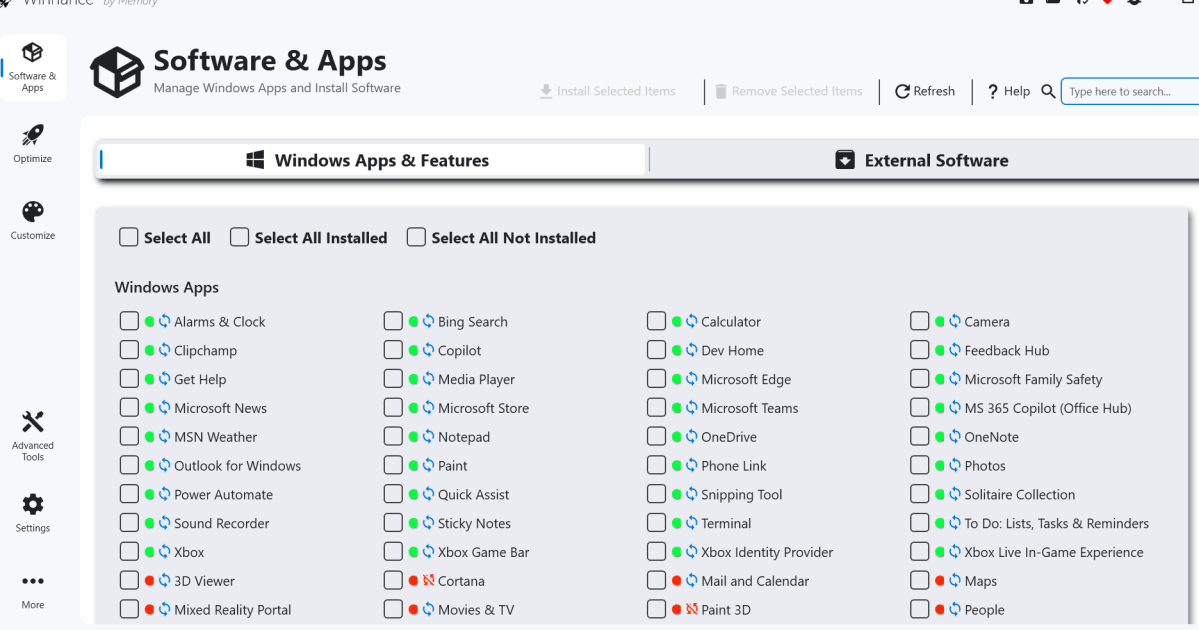
Đầu tiên, bạn cần tải xuống và cài đặt Winhance, một ứng dụng mã nguồn mở được cung cấp miễn phí trên các nền tảng như GitHub. Ở lần khởi chạy đầu tiên, ứng dụng sẽ mất chút thời gian tải dữ liệu vì hệ thống cần kiểm tra xem tính năng khôi phục (System Restore) đã được kích hoạt hay chưa. Ngay trên màn hình chính, bạn sẽ được chào đón bằng danh sách toàn bộ các ứng dụng cài sẵn trên Windows. Việc gỡ bỏ bloatware giờ đây vô cùng đơn giản: bạn chỉ cần tích chọn những ứng dụng không mong muốn và nhấn nút <i data-index-in-node="507" data-path-to-node="5">Remove Selected Items</i> (Xóa các mục đã chọn) ở thanh công cụ phía trên.</p>

<p data-path-to-node="6">Để giúp người dùng dễ theo dõi, Winhance sử dụng hệ thống ký hiệu màu sắc rất trực quan. Sau khi gỡ cài đặt, tên ứng dụng sẽ chuyển từ chấm màu xanh lá sang chấm màu đỏ. Đặc biệt, nếu bên cạnh chấm đỏ có hình chữ thập, điều đó đồng nghĩa với việc bạn không thể cài lại ứng dụng đó nữa; ngược lại, biểu tượng tái chế màu xanh dương biểu thị rằng bạn hoàn toàn có thể khôi phục lại ứng dụng nếu đổi ý. Không chỉ can thiệp vào ứng dụng hệ thống, Winhance còn hỗ trợ quản lý phần mềm của bên thứ ba. Chỉ cần chuyển sang tab <i data-index-in-node="520" data-path-to-node="6">External Software</i> (Phần mềm bên ngoài) ở bên phải, bạn có thể dễ dàng cài đặt hoặc gỡ bỏ các ứng dụng ngoài chỉ bằng thao tác đánh dấu tích tương tự.</p>

<p data-path-to-node="7">Bên cạnh khả năng &quot;dọn rác&quot; mạnh mẽ, Winhance còn là một trung tâm tối ưu hóa hệ thống đa năng. Khi truy cập vào tab <i data-index-in-node="117" data-path-to-node="7">Optimize</i> (Tối ưu hóa) ở cột bên trái, bạn sẽ tìm thấy một danh sách cuộn tập hợp mọi cài đặt vốn nằm rải rác khắp Windows. Tại đây, bạn có thể kiểm soát mọi thứ từ các tùy chọn bảo mật cho đến việc tắt quảng cáo và nội dung đề xuất. Điểm sáng giá nhất của khu vực này nằm ở phần <i data-index-in-node="396" data-path-to-node="7">System Services</i> (Dịch vụ hệ thống). Thay vì phải phỏng đoán, Winhance cung cấp mô tả chi tiết về những gì sẽ xảy ra nếu bạn tắt một dịch vụ cụ thể, giúp bạn tránh được những rủi ro gây lỗi hệ thống.</p>

<p data-path-to-node="8">Ngoài ra, ứng dụng còn cung cấp quyền kiểm soát Windows Updates. Mặc dù việc tắt hoàn toàn cập nhật không được khuyến khích, bạn vẫn có thể tinh chỉnh để hệ thống chỉ tải xuống các bản vá bảo mật quan trọng. Cuối cùng, để cá nhân hóa chiếc PC, bạn hãy ghé thăm tab <i data-index-in-node="265" data-path-to-node="8">Customizations</i> (Tùy chỉnh). Nơi đây cung cấp hàng loạt thiết lập giao diện, cho phép bạn chuyển đổi nhanh chóng giữa chế độ Sáng/Tối (Light/Dark mode) hoặc thay đổi kiểu dáng của thanh Taskbar theo sở thích cá nhân.</p>

<p data-path-to-node="9">Nhìn chung, Winhance mang đến một phương thức cực kỳ tiện lợi để thiết lập và làm chủ hệ thống Windows. Bằng cách gộp chung việc cài đặt, gỡ bỏ ứng dụng hàng loạt và tinh chỉnh hệ thống vào một nơi duy nhất, đây thực sự là một công cụ đáng để bạn trải nghiệm nhằm mang lại luồng sinh khí mới cho chiếc máy tính của mình.</p>
		</div>
				<div id="author">
						<p>
				<strong>Nguồn tin:</strong>
				Pcworld
			</p>
		</div>
	</div>
	<div id="footer" class="clearfix">
		<div id="url">
			<strong>URL của bản tin này: </strong><a href="https://luatnguyen.vn/tin-tuc/huong-dan-don-sach-bloatware-quang-cao-va-toi-uu-hoa-windows-11-mien-phi-voi-winhance-1451.html" title="Hướng dẫn dọn sạch bloatware, quảng cáo và tối ưu hóa Windows 11 miễn phí với Winhance">https://luatnguyen.vn/tin-tuc/huong-dan-don-sach-bloatware-quang-cao-va-toi-uu-hoa-windows-11-mien-phi-voi-winhance-1451.html</a>

		</div>
		<div class="clear"></div>
		<div class="copyright">
			&copy; HỆ THỐNG LUẬT NGUYỄN - DỊCH VỤ LUẬT - TÀI CHÍNH KẾ TOÁN - THUẾ
		</div>
		<div id="contact">
			<a href="mailto:webmaster@luatnguyen.vn">webmaster@luatnguyen.vn</a>
		</div>
	</div>
</div>
        <div id="timeoutsess" class="chromeframe">
            Bạn đã không sử dụng Site, <a onclick="timeoutsesscancel();" href="https://luatnguyen.vn/#">Bấm vào đây để duy trì trạng thái đăng nhập</a>. Thời gian chờ: <span id="secField"> 60 </span> giây
        </div>
        <div id="openidResult" class="nv-alert" style="display:none"></div>
        <div id="openidBt" data-result="" data-redirect=""></div>
<div class="nv-contact-sticky">
    <a href="tel:0986865967" class="btn-phone" title="Gọi ngay: 0986865967">
        <i class="fa fa-phone" aria-hidden="true"></i>
    </a>

    <a href="https://zalo.me/0986865967" target="_blank" class="btn-zalo" title="Chat Zalo">
        Zalo
    </a>
</div>
<script src="https://luatnguyen.vn/assets/js/jquery/jquery.min.js"></script>
<script>var nv_base_siteurl="/",nv_lang_data="vi",nv_lang_interface="vi",nv_name_variable="nv",nv_fc_variable="op",nv_lang_variable="language",nv_module_name="news",nv_func_name="savefile",nv_is_user=0, nv_my_ofs=-4,nv_my_abbr="EDT",nv_cookie_prefix="nv4",nv_check_pass_mstime=1738000,nv_area_admin=0,nv_safemode=0,theme_responsive=1,nv_is_recaptcha=0;</script>
<script src="https://luatnguyen.vn/assets/js/language/vi.js"></script>
<script src="https://luatnguyen.vn/assets/js/global.js"></script>
<script src="https://luatnguyen.vn/themes/default/js/news.js"></script>
<script src="https://luatnguyen.vn/themes/default/js/main.js"></script>
<script type="application/ld+json">
	{
	  "@context": "https://schema.org",
	  "@graph": [
	    {
	      "@type": "Organization",
	      "@id": "https://luatnguyen.vn/#organization",
	      "name": "LUẬT NGUYỄN GROUP | VĂN PHÒNG LUẬT SƯ MINH QUÂN | DỊCH VỤ THUẾ KẾ TOÁN",
	      "url": "https://ipped.vn/",
	      "logo": {
	        "@type": "ImageObject",
	        "url": "https://luatnguyen.vn/uploads/logo-250.png",
	        "width": 512,
	        "height": 512
	      },
	      "sameAs": [
	        "https://www.facebook.com/vpls.luatnguyen",
	        "https://www.youtube.com/@LuatNguyencorp",
	        "https://www.tiktok.com/@luat_su_luat_nguyen"
	      ],
	      "contactPoint": {
	        "@type": "ContactPoint",
	        "telephone": "+84-0986865967",
	        "contactType": "customer service",
	        "areaServed": "VN",
	        "availableLanguage": "Vietnamese"
	      }
	    },
	    {
	      "@type": "WebSite",
	      "@id": "https://luatnguyen.vn/#website",
	      "url": "https://luatnguyen.vn/",
	      "name": "LUẬT NGUYỄN GROUP | VĂN PHÒNG LUẬT SƯ MINH QUÂN | DỊCH VỤ THUẾ KẾ TOÁN",
	      "publisher": {
	        "@id": "https://luatnguyen.vn/#organization"
	      },
	      "potentialAction": {
	        "@type": "SearchAction",
	        "target": "https://luatnguyen.vn/search?q=",
	        "query-input": "required name=search_term_string"
	      }
	    }
	  ]
	}
	</script>
<script src="https://luatnguyen.vn/themes/default/js/bootstrap.min.js"></script>
</body>
</html>